
一個功能強大但用戶友好的插件,可以為長頁面(和自定義帖子類型)自動創(chuàng)建特定于上下文的索引或目錄(TOC)。該插件不僅僅是目錄插件,它還可以輸出列出整個網(wǎng)站上的頁面和/或類別的站點地圖。
- 原文來源:詳情
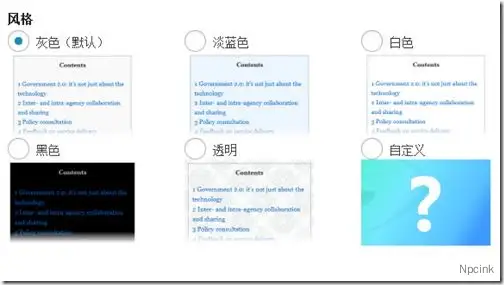
描述
目錄是從頭開始構(gòu)建的,并且考慮到了Wikipedia,默認情況下,目錄出現(xiàn)在頁面的第一個標(biāo)題之前。這使作者可以插入可以概述或介紹頁面其余部分的導(dǎo)入內(nèi)容。它還使用了獨特的編號方案,不會因跨主題的CSS差異而丟失。
該插件是內(nèi)容豐富站點(例如面向內(nèi)容管理系統(tǒng)的配置)的絕佳伴侶。也就是說,博客作者在編寫較長的結(jié)構(gòu)化文章時也具有相同的好處。了解Google如何使用此索引為您的內(nèi)容提供“跳轉(zhuǎn)到”鏈接。
包括一個管理選項面板,您可以在其中自定義設(shè)置(例如顯示位置),定義顯示索引之前的最小標(biāo)題數(shù),其他外觀等。對于高級用戶,請擴展高級選項以進一步調(diào)整其行為-例如:排除不希望出現(xiàn)的航向級別,例如h5和h6;禁用包含的CSS文件的輸出;調(diào)整頂部偏移量等等。使用短代碼,您可以覆蓋默認行為,例如特定頁面上的特殊排除,甚至完全隱藏目錄。
傾向于在側(cè)邊欄中包含索引?轉(zhuǎn)到外觀>小部件,然后將TOC +拖到所需的側(cè)邊欄和位置。
支持自定義帖子類型,但是,僅當(dāng)the_content()自定義帖子類型使用自動插入功能時,自動插入才有效。每種帖子類型都會出現(xiàn)在選項面板中,因此請啟用所需的帖子。
翻譯
- 澳大利亞英語(默認)
- 丹麥文-?庫普努
- 荷蘭人–?蕾妮
- 法語– Jean-Michel Duriez
- 德語–?本
- 希臘文–?Dimitrios Kaisaris
- 希伯來語-?阿雷拉爾
- 日語–?シカマル
- 波蘭語-?雅庫布
- 簡體中文– Jason
- 斯洛伐克語-Boris Gereg
- 烏克蘭語–?邁克爾·尤納特
安裝/升級
通過從插件添加菜單或直接從WordPress插件存儲庫中搜索Table of Contents Plus來安裝插件。
沒有特別的升級說明(woohoo!)。使用最新的覆蓋現(xiàn)有文件夾或使用插件菜單中的簡化方法。您的選擇不會丟失。
救命
最簡單的方法
對于不耐煩的人,您要做的就是啟用插件。
該插件將應(yīng)用默認設(shè)置,并在具有四個或更多標(biāo)題的頁面上第一個標(biāo)題(不是帖子,也不是自定義帖子類型)之前生成目錄。
不需要簡碼。
我的目錄在哪里?
- 在大多數(shù)情況下,帖子,頁面或自定義帖子類型的標(biāo)題少于最小標(biāo)題數(shù)。默認情況下,此設(shè)置為4,因此請確保內(nèi)容中至少包含四個標(biāo)題。如果要更改此值,可以在“主要選項”>“顯示時間”下找到它。
- 您的內(nèi)容類型是否啟用了自動插入?默認情況下,僅啟用頁面。
- 您
[no_toc]在內(nèi)容中找到了什么嗎?這將禁用當(dāng)前帖子,頁面或自定義帖子類型的索引。 - 如果您使用的是TOC +小部件,請檢查是否啟用了“僅在側(cè)欄中顯示目錄”,因為這會將其顯示限制為僅在側(cè)欄中。您可以進入外觀>小部件進行檢查。
- 您可能將生成限制為URL路徑匹配。該設(shè)置可以在“主選項”下的高級部分中找到。
如何阻止目錄顯示在單個頁面上?
將以下內(nèi)容[no_toc]放置在頁面上的任何位置以隱藏目錄。這被稱為簡碼,適用于使用the_content()的帖子,頁面和自定義帖子類型
我已將包裹設(shè)置為左或右,但標(biāo)題未包裹目錄
通常在主題附近的標(biāo)題中或標(biāo)題附近有CSS清除指令時會發(fā)生這種情況(二十一個和二十二個是這兩個主題)。該指令告訴用戶代理重置以前的包裝規(guī)范。
您可以調(diào)整主題的CSS或嘗試將目錄位置移到頁面頂部。如果您沒有構(gòu)建主題,則強烈建議您嘗試更改CSS時嘗試使用Custom CSS插件。
嘗試添加以下CSS,以允許在目錄周圍進行換行:
h1, h2, h3, h4, h5, h6 { clear: none; }
如何在目錄標(biāo)題中包含頁面名稱?
當(dāng)頁面標(biāo)題根據(jù)您正在查看的頁面而變化時,您可以使用以下特殊變量將頁面標(biāo)題自動插入目錄標(biāo)題中:
%PAGE_NAME%
您可以按原樣使用它,也可以在變量的兩邊放置文本。
例如:如果您的頁面被命名為Great Expectations,并且目錄標(biāo)題設(shè)置為Contents for%PAGE_NAME%,則最終標(biāo)題將顯示Contents for Great Expectations
我的網(wǎng)站有100頁,但我只希望目錄出現(xiàn)在其中的10頁上
您可以[no_toc]輸入90頁,但那并不有趣……所以請嘗試以下操作:
- 轉(zhuǎn)到“設(shè)置”>“ TOC +”,然后禁用頁面(或正在使用的內(nèi)容類型)的自動插入選項。
- 添加
[toc]到需要它們的10頁上。請注意,目錄將出現(xiàn)在您放置短代碼的位置。
或者,如果您要全部包含索引的頁面都屬于站點的特定部分(例如/ doc /),則也可以嘗試使用限制路徑選項。
我想忽略某些標(biāo)題
如果您想忽略某些標(biāo)題,請使用“排除標(biāo)題”選項。用管道將多個標(biāo)題分開|。使用星號*作為通配符來匹配其他文本。請注意,這不區(qū)分大小寫。一些示例包括:
Fruit*忽略以Fruit開頭的標(biāo)題*Fruit Diet*忽略標(biāo)題中某處的“?水果飲食?”標(biāo)題Apple Tree|Oranges|Yellow Bananas忽略完全是蘋果樹,橘子或黃香蕉的標(biāo)題
側(cè)邊欄可以有目錄嗎?
使用TOC +小部件并將其拖動到所需位置。如果您希望目錄僅顯示在側(cè)邊欄中,請確保在窗口小部件中打勾該選項。
與Wikipedia不同,我希望所有錨點都小寫并使用連字符而不是下劃線
有兩個選項可讓您調(diào)整大小寫和連字符。如果您仍然需要更多,可以通過連接到toc_url_anchor_target過濾器上進行按摩。有關(guān)示例,請參見開發(fā)人員部分。
我想加入一個站點地圖
- 為您的站點地圖創(chuàng)建一個頁面(如果已有頁面,請改用該頁面)。
- 添加
[sitemap]到您的頁面并保存。
上面是集成列出所有頁面和類別的站點地圖的最簡單示例。您可以在“設(shè)置”>“ TOC +”下自定義站點地圖選項,或通過以下與站點地圖相關(guān)的短代碼查看一些更高級的用法。
您還可以使用文本小部件并粘貼任何站點地圖簡碼來合并站點地圖。
該站點地圖使用的奇怪字體與該站點的其余部分不同
沒有為站點地圖創(chuàng)建任何其他樣式,而是繼承了您在添加簡碼時使用的任何樣式。如果您復(fù)制并粘貼,則可能還復(fù)制了它周圍的“代碼”標(biāo)簽,因此,請刪除它們。
在大多數(shù)情況下,請嘗試將簡碼放在自己的行中,方括號之前或之后都不要包含任何內(nèi)容。
簡碼
該插件被設(shè)計為盡可能無縫且無痛苦,并且不需要您插入操作的簡碼。但是,使用簡碼可以完全控制目錄在頁面中的位置。以下簡短代碼可與此插件一起使用。
如果下面的短代碼省略了參數(shù),它們將退回到您在“設(shè)置”>“ TOC +”下定義的設(shè)置。
| 短代碼 | 描述 | 屬性 |
|---|---|---|
| [目錄] | 使您可以在首選位置生成目錄。對于只需要少量頁面上的目錄的網(wǎng)站也很有用。 | 標(biāo)簽:文字,目錄標(biāo)題no_label:true / false,顯示或隱藏標(biāo)題包裝:文字,“左”或“右”heading_levels:數(shù)字,這使您可以選擇要包含在目錄中的標(biāo)題級別。用逗號分隔多個級別。示例:包括標(biāo)題3、4和5,但排除其他帶有heading_levels="3,4,5"exclude:文本,輸入要排除的標(biāo)題。用管道將多個標(biāo)題分開|。使用星號*作為通配符來匹配其他文本。您也可以使用正則表達式進行更高級的匹配。class:文本,輸入要添加到容器的CSS類。用空格分隔多個類。 |
| [no_toc] | 允許您禁用當(dāng)前帖子,頁面或自定義帖子類型的目錄。 | ? |
| [網(wǎng)站地圖] | 生成您網(wǎng)站的所有頁面和類別的列表。您可以在任何帖子,頁面甚至是文本小部件中使用它。 | ? |
| [sitemap_pages] | 使您僅打印頁面列表。 | 標(biāo)題:1到6之間的數(shù)字,定義要使用的html標(biāo)題標(biāo)簽:文本,列表標(biāo)題no_label:true / false,顯示或隱藏列表標(biāo)題排除:您要排除的頁面或類別的IDexclude_tree:您要排除的頁面或類別的ID,包括其所有后代 |
| [sitemap_categories] | 與[sitemap_pages]類似,但類別不同。 | ? |
| [sitemap_posts] | 這使您可以打印出網(wǎng)站上所有已發(fā)布文章的索引。默認情況下,帖子按字母順序列出,并按首字母分組。每個部分,字母和列表都有CSS類,可讓您自定義外觀。 | 順序:文字,ASC或DESCorderby:文本,常用的選項包括“標(biāo)題”,“日期”,“ ID”和“ rand”。有關(guān)列表,請參見WP_Query。split:true / false(默認為true),設(shè)置為false時不按首字母分隔列表。 |
對于開發(fā)人員
如何自定義錨點?
如果您仍然對錨不滿意,可以通過連接到toc_url_anchor_target過濾器的自定義函數(shù)來修改錨以適合您的需求。例如,將以下代碼片段放入您的functions.php文件中,以將所有錨點轉(zhuǎn)換為大寫字母。
function my_custom_anchor( $anchor )
{
	return strtoupper( $anchor );
}
add_filter( 'toc_url_anchor_target', 'my_custom_anchor' );
Contents Plus
A powerful yet user friendly plugin that automatically creates a context specific index or table of contents (TOC) for long pages (and custom post types). More than just a table of contents plugin, this plugin can also output a sitemap listing pages and/or categories across your entire site.
Contents?[hide]
- 1?Description
- 2?Translations
- 3?Screenshots
- 4?Install / upgrade
- 5?Help
- 5.1?The simplest approach
- 5.2?Where’s my table of contents?
- 5.3?How do I stop the table of contents from appearing on a single page?
- 5.4?I’ve set wrapping to left or right but the headings don’t wrap around the table of contents
- 5.5?How do I include the name of the page in the table of contents title?
- 5.6?My site has 100 pages but I only want the table of contents to appear on 10 of them
- 5.7?I want to ignore certain headings
- 5.8?Can I have the table of contents in the sidebar?
- 5.9?Unlike Wikipedia, I want all my anchors to be lowercase and use hyphens rather than underscores
- 5.10?I would like to incorporate a sitemap
- 5.11?The sitemap uses a strange font dissimilar to the rest of the site
- 6?Shortcodes
- 7?For developers
- 8?I love it, how can I show my appreciation?
- 9?Questions or suggestions?
Description
Built from the ground up and with Wikipedia in mind, the table of contents by default appears before the first heading on a page. This allows the author to insert lead-in content that may summarise or introduce the rest of the page. It also uses a unique numbering scheme that doesn’t get lost through CSS differences across themes.
This plugin is a great companion for content rich sites such as content management system oriented configurations. That said, bloggers also have the same benefits when writing long structured articles.?Discover how Google?uses this index to provide ‘Jump To’ links to your content.
Includes an administration options panel where you can customise settings like display position, define the minimum number of headings before an index is displayed, other appearance, and more. For power users, expand the advanced options to further tweak its behaviour – eg: exclude undesired heading levels like h5 and h6 from being included; disable the output of the included CSS file; adjust the top offset and more. Using shortcodes, you can override default behaviour such as special exclusions on a specific page or even to hide the table of contents altogether.
Prefer to include the index in the sidebar? Go to Appearance > Widgets and drag the TOC+ to your desired sidebar and position.
Custom post types are supported, however, auto insertion works only when?the_content()?has been used by the custom post type. Each post type will appear in the options panel, so enable the ones you want.
Translations
- Australian English (default)
- Danish –?Cupunu
- Dutch –?Renee
- French – Jean-Michel Duriez
- German –?Ben
- Greek –?Dimitrios Kaisaris
- Hebrew –?Ahrale
- Japanese –?シカマル
- Polish –?Jakub
- Simplified Chinese – Jason
- Slovak – Boris Gereg
- Ukrainian –?Michael Yunat
Translations are more than welcome. The translation file can be found in the languages folder of the plugin, or?online in the WordPress repository.
If you have any advice in making it easier to translate, please let me know.
Screenshots
An example of the table of contents, positioned at the top, right aligned, and a width of 275pxAn example of the sitemap_pages shortcodeAn example of the sitemap_posts shortcode
The options panel found in Settings > TOC+Some advanced optionsThe sitemap tab
Install / upgrade
Install the plugin by searching for?Table of Contents Plus?from the plugin add menu, or directly from the?WordPress plugins repository.
There are no special upgrade instructions (woohoo!). Overwrite your existing folder with the latest or use the streamlined approach in the plugin menu. Your options will not be lost.
Help
The simplest approach
For the impatient, all you have to do is enable the plugin.
The plugin will apply default settings and produce the table of contents before the first heading on pages (not posts, nor custom post types) with?four or more?headings.
No shortcodes are needed.
Where’s my table of contents?
- In most cases, the post, page or custom post type has less than the minimum number of headings. By default, this is set to four so make sure you have at least four headings within your content. If you want to change this value, you can find it under ‘Main Options’ > ‘Show when’.
- Is auto insertion enabled for your content type? By default, only pages are enabled.
- Have you got?
[no_toc]?somewhere within the content? This will disable the index for the current post, page or custom post type. - If you are using the TOC+ widget, check if you have the?“Show the table of contents only in the sidebar”?enabled as this will limit its display to only the sidebar. You can check by going into Appearance > Widgets.
- You may have restricted generation to a URL path match. The setting can be found in the advanced section under Main Options.
How do I stop the table of contents from appearing on a single page?
Place the following?[no_toc]?anywhere on the page to suppress the table of contents. This is known as a shortcode and works for posts, pages and custom post types that make use of the_content()
I’ve set wrapping to left or right but the headings don’t wrap around the table of contents
This normally occurs when there is a CSS clear directive in or around the heading originating from the theme (Twenty Eleven and Twenty Twelve are two themes which do this). This directive tells the user agent to reset the previous wrapping specifications.
You can adjust your theme’s CSS or try moving the table of contents position to the top of the page. If you didn’t build your theme, I’d highly suggest you try the?Custom CSS plugin?if you wish to make CSS changes.
Try adding the following CSS to allow the wrapping to occur around the table of contents:
h1, h2, h3, h4, h5, h6 { clear: none; }
How do I include the name of the page in the table of contents title?
As the title of the page changes depending on the page you’re viewing, you can use the following special variable to automatically insert the title of the page into the table of contents heading:
%PAGE_NAME%
You can use it as is or place text either side of the variable.
As an example: if your page is named?Great Expectations?and your table of contents title is set to?Contents for %PAGE_NAME%, the final title would read?Contents for Great Expectations
My site has 100 pages but I only want the table of contents to appear on 10 of them
You could put?[no_toc]?on the 90 pages but that wouldn’t be fun… so try the following:
- Go to Settings > TOC+ and disable the auto insertion option for pages (or the content type you’re working with).
- Add?
[toc]?onto the 10 pages that need them. Note that the table of contents will appear where you placed the shortcode.
Alternatively, you could also experiment with the restrict path option if the pages you want to include the index on all fall within a certain section of your site (eg /doc/).
I want to ignore certain headings
Use the ‘exclude headings’ option if you would like to ignore certain headings. Separate multiple headings with a pipe?|. Use an asterisk?*?as a wildcard to match other text. Note that this is not case sensitive. Some examples include:
Fruit*?ignore headings starting with?Fruit*Fruit Diet*?ignore headings with?Fruit Diet?somewhere in the headingApple Tree|Oranges|Yellow Bananas?ignore headings that are exactly?Apple Tree,?Oranges?or?Yellow Bananas
Can I have the table of contents in the sidebar?
Use the TOC+ widget and drag it into your desired position. If you want the table of contents to only be displayed in the sidebar, then make sure you tick that option in the widget.
Unlike Wikipedia, I want all my anchors to be lowercase and use hyphens rather than underscores
There are two options that allow you to adjust the casing and use of hyphens. If you still require more, you can massage it a little more by attaching into the?toc_url_anchor_target?filter. See the?developers?section for an example.
I would like to incorporate a sitemap
- Create a page for your sitemap (if you have an existing one, use that instead).
- Add?
[sitemap]?into your page and save.
The above is the simplest example of integrating a sitemap listing all pages and categories. You can customise the sitemap options under Settings > TOC+ or check out some of the more advanced uses with the sitemap related shortcodes below.
You could also incorporate a sitemap using a text widget and pasting any of the sitemap shortcodes.
The sitemap uses a strange font dissimilar to the rest of the site
No extra styles are created for the sitemap, instead it inherits any styles you used when adding the shortcode. If you copy and pasted, you probably also copied the ‘code’ tags surrounding it so remove them if this is the case.
In most cases, try to have the shortcode on its own line with nothing before or after the square brackets.
Shortcodes
The plugin was designed to be as seamless and painfree as possible and did not require you to insert a shortcode for operation. However, using the shortcode allows you to fully control the position of the table of contents within your page. The following shortcodes are available with this plugin.
When parameters are left out for the shortcodes below, they will fallback to the settings you defined under Settings > TOC+.
| SHORTCODE | DESCRIPTION | ATTRIBUTES |
|---|---|---|
| [toc] | Lets you generate the table of contents at the preferred position. Also useful for sites that only require a TOC on a small handful of pages. | label: text, title of the table of contentsno_label: true/false, shows or hides the titlewrapping: text, either “l(fā)eft” or “right”heading_levels: numbers, this lets you select the heading levels you want included in the table of contents. Separate multiple levels with a comma. Example: include headings 3, 4 and 5 but exclude the others with?heading_levels="3,4,5"exclude: text, enter headings to be excluded. Separate multiple headings with a pipe?|. Use an asterisk?*?as a wildcard to match other text. You could also use regular expressions for more advanced matching.class: text, enter CSS classes to be added to the container. Separate multiple classes with a space. |
| [no_toc] | Allows you to disable the table of contents for the current post, page, or custom post type. | ? |
| [sitemap] | Produces a listing of all pages and categories for your site. You can use this on any post, page or even in a text widget. | ? |
| [sitemap_pages] | Lets you print out a listing of only pages. | heading: number between 1 and 6, defines which html heading to uselabel: text, title of the listno_label: true/false, shows or hides the list headingexclude: IDs of the pages or categories you wish to excludeexclude_tree: ID of the page or category you wish to exclude including its all descendants |
| [sitemap_categories] | Similar to [sitemap_pages] but for categories. | ? |
| [sitemap_posts] | This lets you print out an index of all published posts on your site. By default, posts are listed in alphabetical order grouped by their first letters. There are CSS classes for each section, letter and list allowing you to customise the appearance. | order: text, either ASC or DESCorderby: text, popular options include “title”, “date”, “ID”, and “rand”. See?WP_Query?for a list.separate: true/false (defaults to true), does not separate the lists by first letter when set to false. |
For developers
How do I customise my anchors?
If you’re still not happy with the anchors, you can modify them to suit your needs through a custom function hooked into the?toc_url_anchor_target?filter. As an example, place the below code snippet into your functions.php file to convert all anchors to uppercase.
function my_custom_anchor( $anchor )
{
	return strtoupper( $anchor );
}
add_filter( 'toc_url_anchor_target', 'my_custom_anchor' );
toc_get_index( $content = ”, $prefix_url = ” )
返回目錄的HTML格式字符串,而沒有周圍的UL或OL標(biāo)簽,以允許主題編輯器向外部列表提供其自己的ID和/或類。
這兩個參數(shù)都是可選的:
$content是帶有標(biāo)題的全部內(nèi)容。如果為空,則默認為$ post中的當(dāng)前內(nèi)容(例如,在“循環(huán)”中)。$prefix_url是以錨作為前綴的URL。如果提供了字符串,則將按原樣使用。如果設(shè)置為“ true”,則將嘗試從$ post對象獲取永久鏈接。
這些示例假定您處于“循環(huán)”中:
獲取當(dāng)前頁面的索引
echo '<ul id="my_toc">' . toc_get_index() . '</ul>';創(chuàng)建所有子項目及其標(biāo)題的清單
$children = new WP_Query(array(
	'post_parent' => get_the_ID(),
	'posts_per_page' => -1	// get all children
));
while ( $children->have_posts() ) {
	$children->the_post();
	echo
		'<h3>' . get_the_title() . '</h3>' .
		'<ul>' . toc_get_index( get_the_content(), get_permalink( $children->post->ID ) ) . '</ul>'
	;
}
wp_reset_postdata();
版本控制方案
我采用了相同的Ubuntu版本控制方案,因此第一個版本是1107。
同月的其他發(fā)行版將是點發(fā)行,例如,2011年7月的第二個發(fā)行版是1107.1。
我喜歡它,該如何表達我的贊賞?
如果您對這個插件印象深刻,并且想以某種方式表示感謝,而不是像我一樣發(fā)送捐款,請捐款給您選擇的慈善機構(gòu)。如有需要,請隨時在此處留言。
我絕不會要求任何形式的獎勵或補償。幫助他人實現(xiàn)目標(biāo)就足夠了??